Why would you trust the GUI? Escaping Ephemeral Google Cloud Shell for Persistent RCE
his is the story of how a feature designed specifically to isolate untrusted code in the Google Cloud Shell never really did, and how a RCE combined with a sandbox escape ended up being classified as a "feature."
While this is not a zero-click, unauthenticated exploit, the core issue lies in a broken trust boundary. Up until this is fixed, simply opening an untrusted GitHub repository in Google Cloud Shell's "Ephemeral Mode" (untrusted mode) is enough to permanently compromise all of your future, trusted sessions.
What Was at Risk?
On any Google Cloud Shell environment, as of February 2026, any user who clicks a malicious repository link and accepts the prompt could:
- Have their persistent `$HOME/.bashrc` silently modified by untrusted code.
- Grant an attacker persistent, root-level execution on all future Cloud Shell sessions.
- Suffer a complete takeover of their entire GCP infrastructure the moment an active `gcloud` session is loaded.
The user's persistent environment is completely exposed to code executed within what is explicitly advertised as a temporary, deleted-on-exit sandbox.
The Catalyst: Bypassing Workspace Trust
The Cloud Shell Editor is built on Eclipse Theia (an open-source framework for VS Code-like IDEs). This editor runs VS Code-style extensions and is fully compatible with them.
The extension they use to parse and analyze Python files seems to be vulnerable to a variant of CVE-2024-49050, much like the MS-Python VS Code extension was vulnerable a few years ago. I previously worked with the MSRC team to address this specific flaw in Microsoft's VS Code ecosystem.
How the PoC Worked
The entire exploit is pretty simple:
- Attacker: Crafts a Cloud Shell URL pointing to a malicious repository containing a file named helloworld.py and a malicious elf program compiled as python with the +x permission.
https://console.cloud.google.com/cloudshell/open?cloudshell_git_repo=https://github.com/[exampleRepository]/test&cloudshell_open_in_editor=helloworld.py - Victim: Clicks the link and is presented with the "Open in Cloud Shell" confirmation dialog.
The UI states that the session is ephemeral and that the repository is "untrusted by default," promising that "all files will be deleted on session end." The user leaves the "Trust repo" box unchecked and clicks Confirm, expecting a safe, isolated sandbox.
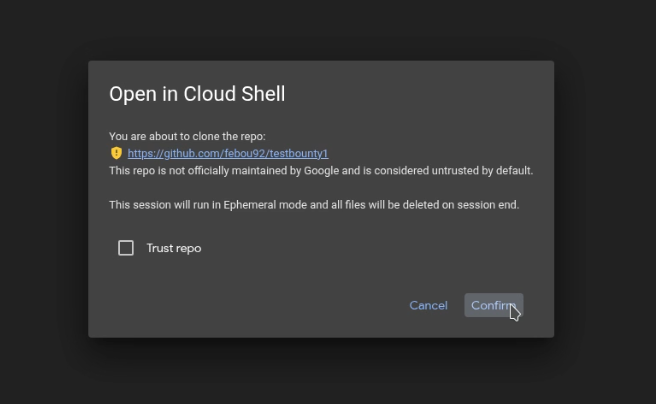 Confirmation dialog mentionning the ephemeral instance. Explicitely running in untrusted mode
 - Under the hood: When the editor automatically opens `helloworld.py`, the Python extension launches our custom python executable, which can now do anything in that environment.
- Privilege escalation and sandbox escape: That ephemeral session shares `$HOME/.bashrc` with the host. As such, we can just append any command to it sith our custom python executable, the next time it launches in normal/trusted mode, it's game over.
The Payload
Well, it's like 5 lines of C. You can figure that one out yourselves.
Wrapping Up
Google's VRP team considered this a social engineering issue and, as such, decided not to fix it or track it as a security bug.
I do not think that trusting a vendor's own GUI should be considered social engineering. But their security model is their decision, and I do understand that. As usual, ensure your vendor’s security priorities align with your operational reality and revalidate these assumptions regularly.
I do understand that a user may want to keep their environment settings working even in an ephemeral session, but this is a textbook case for using an overlayfs with a file modification confirmation prompt for committing changes.
Exercise caution when clicking Cloud Shell links or opening repositories in Cloud Shell, even when relying on the ephemeral mode. Ephemeral mode is not a sandbox (and isn't ephemeral).
Proof.mp4
Click me for proof